 Inchy, a Shopify app by InterioApp
Made to order on Shopify, priced to the penny
Shoppers set their size or upload their logo, watch the product change in front of them, and pay exactly what your price list says. For awnings and outdoor shade, and for t-shirts and team wear ordered in every size at once.
$19.99 a month · unlimited products · 7-day free trial
Try it here
A shop product page with Inchy on it. Pick a product, a look and a screen size, and use it the way your shoppers would.
This is the real builder running live, not a picture. Change the size, the cover or the motor, upload a logo, set the sizes for a team. Sample products with sample prices in pounds; nothing is sold. Each shop sets its own prices and currency.
Made for two kinds of shop
Each comes as a ready template with sample prices. Put in your own prices and it is ready to sell.
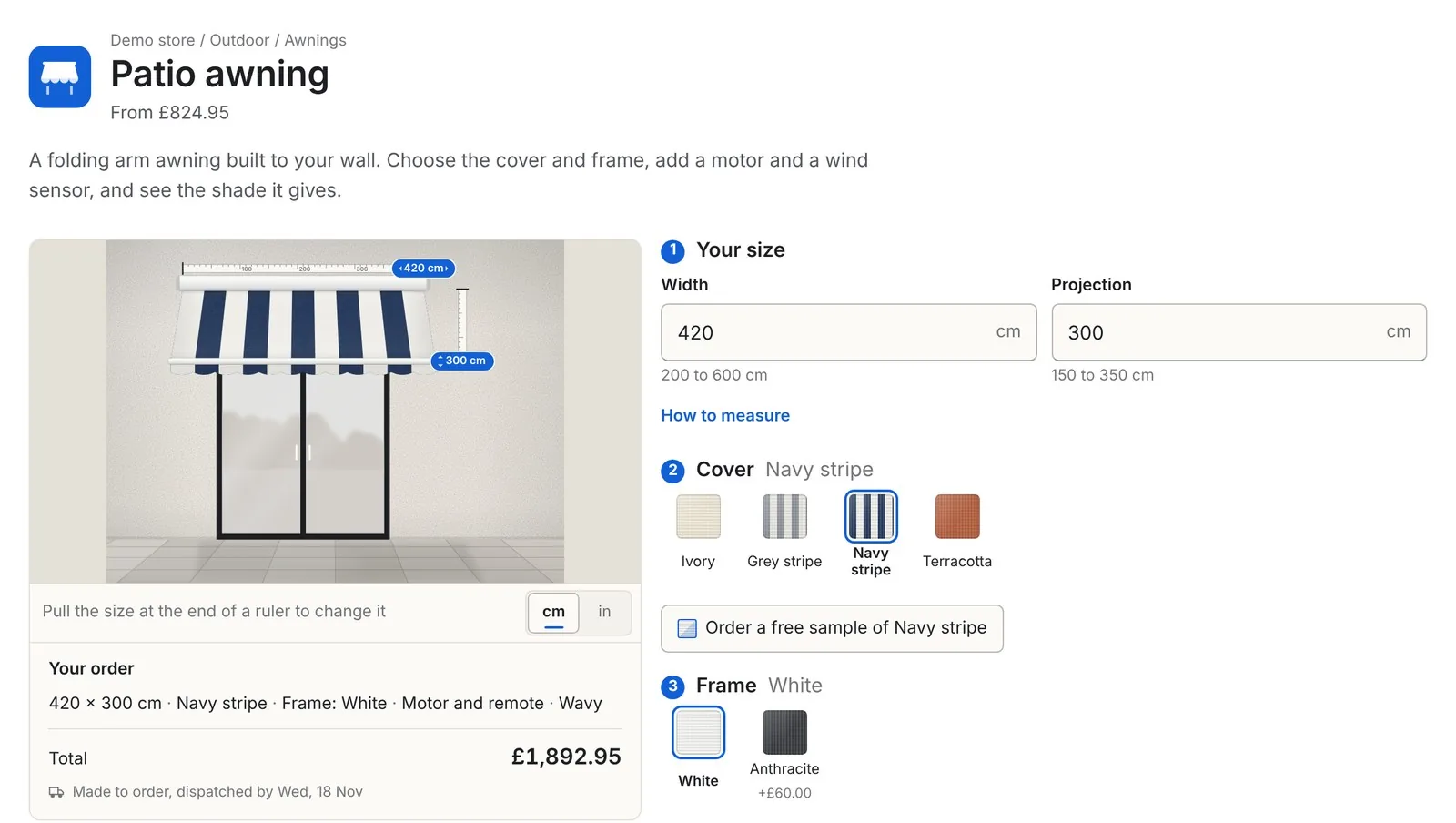
Their width, your price list
- Shoppers type the width and projection, or drag the size on the drawing of the awning
- The price comes from your own grid of widths and projections, in centimetres or inches
- Cover, frame, valance, hand crank or motor, wind sensor and LED lights, each priced your way
- A winter cover is cut to the chosen width and priced for it
- A fabric sample can be ordered before the awning
- Sizes outside your limits are stopped before payment, and big jobs can go to a quote form
Every size in one order
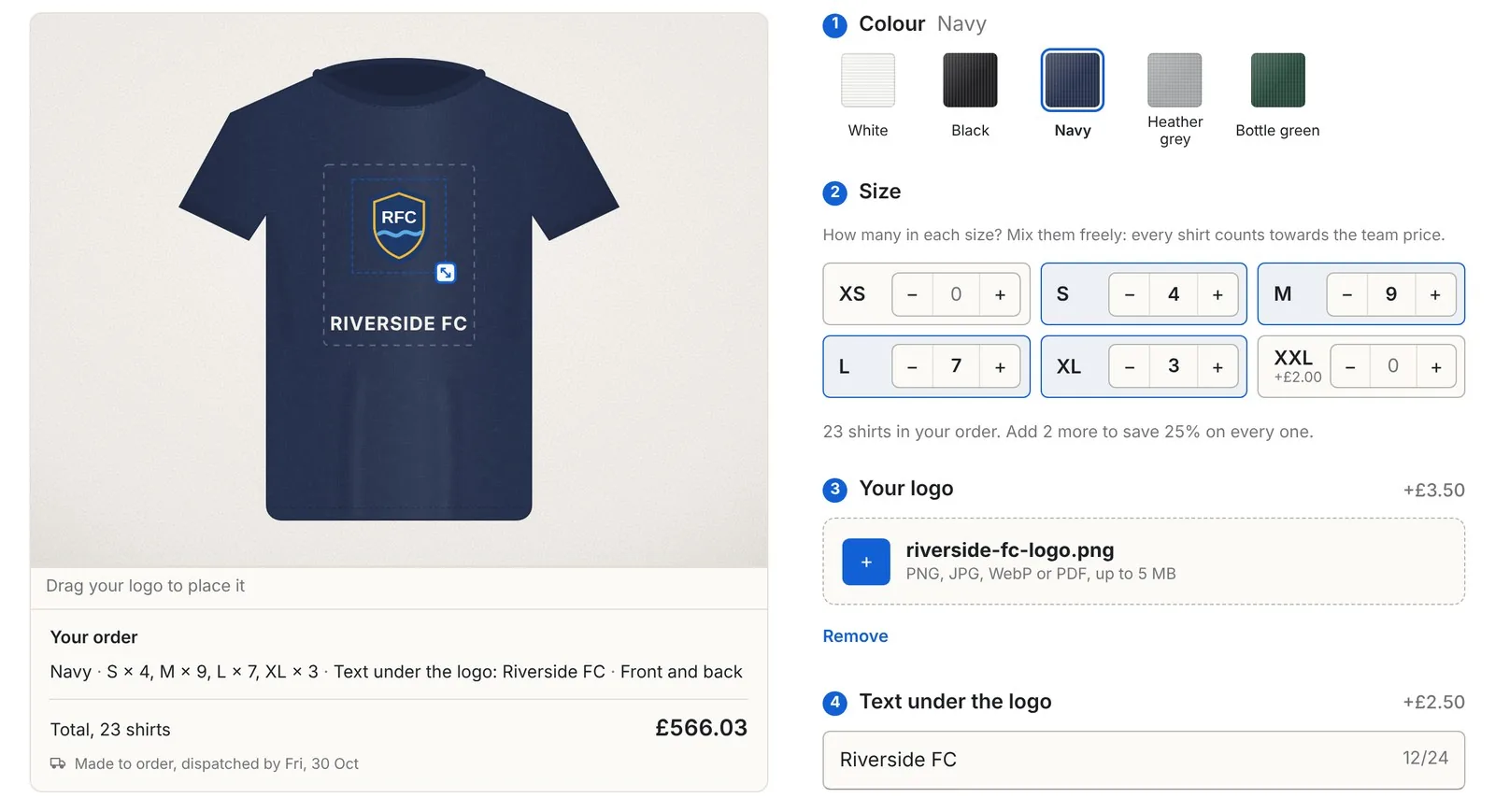
- Shoppers upload their logo and drag it into place on the shirt
- They set how many of each size they need on one page, for example 10 S, 12 M and 8 L
- Every shirt counts towards the team price: 5 save 10%, 12 save 15%, 25 or more save 25%
- Bigger sizes like XXL can cost more, and are charged exactly
- Text under the logo, front or front and back, each with its own price
- Each size lands on the order as its own line, with the logo file attached
Bundles that make each order worth more
The offers sit inside the product form, priced for the shopper’s own size. The saving is taken again at checkout, so the basket always matches the page.
Team prices
5 shirts save 10%, 12 save 15%, 25 or more save 25%, with the old price struck through.
Every size in one order
10 S, 12 M and 8 L in one go. Every shirt counts towards the team price and each size lands on the order as its own line.
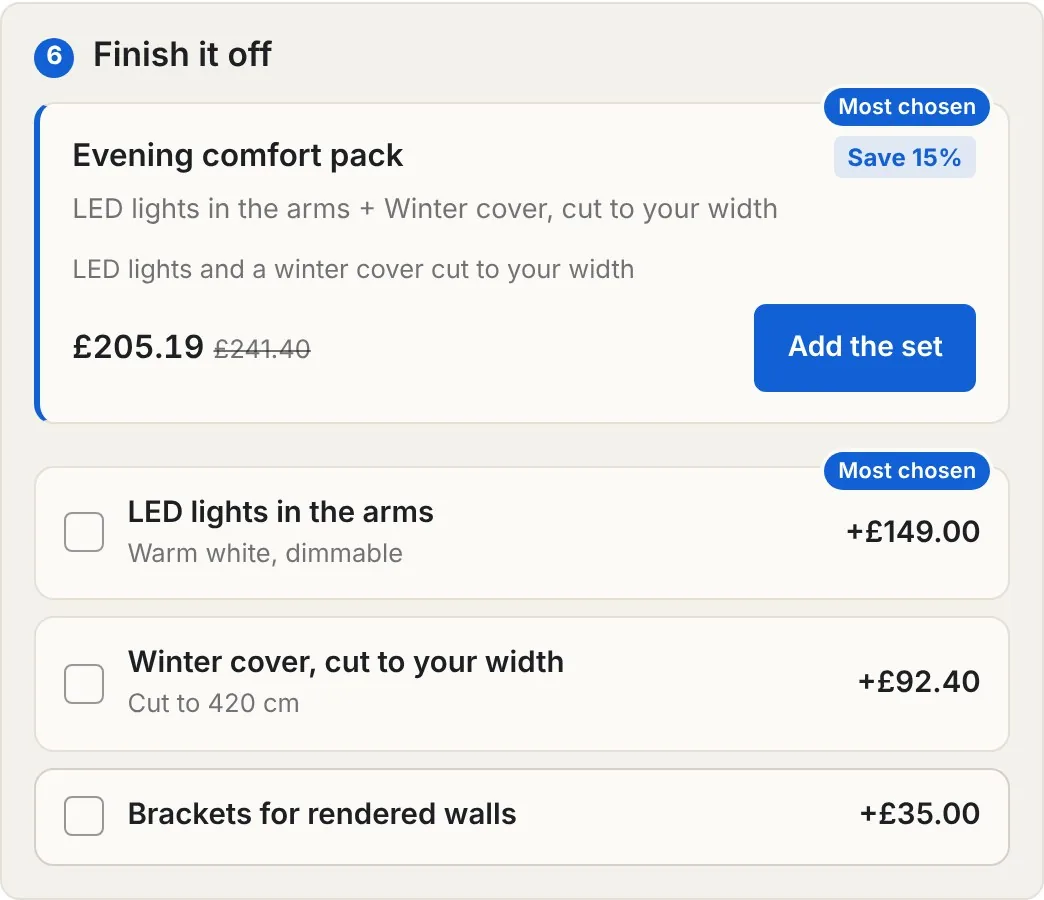
Sets of add-ons
LED lights and a winter cover together for 15% less, or a matching tote and gift wrap for 20% less. Add-ons cut to size are priced for that size.
Every order arrives ready to make
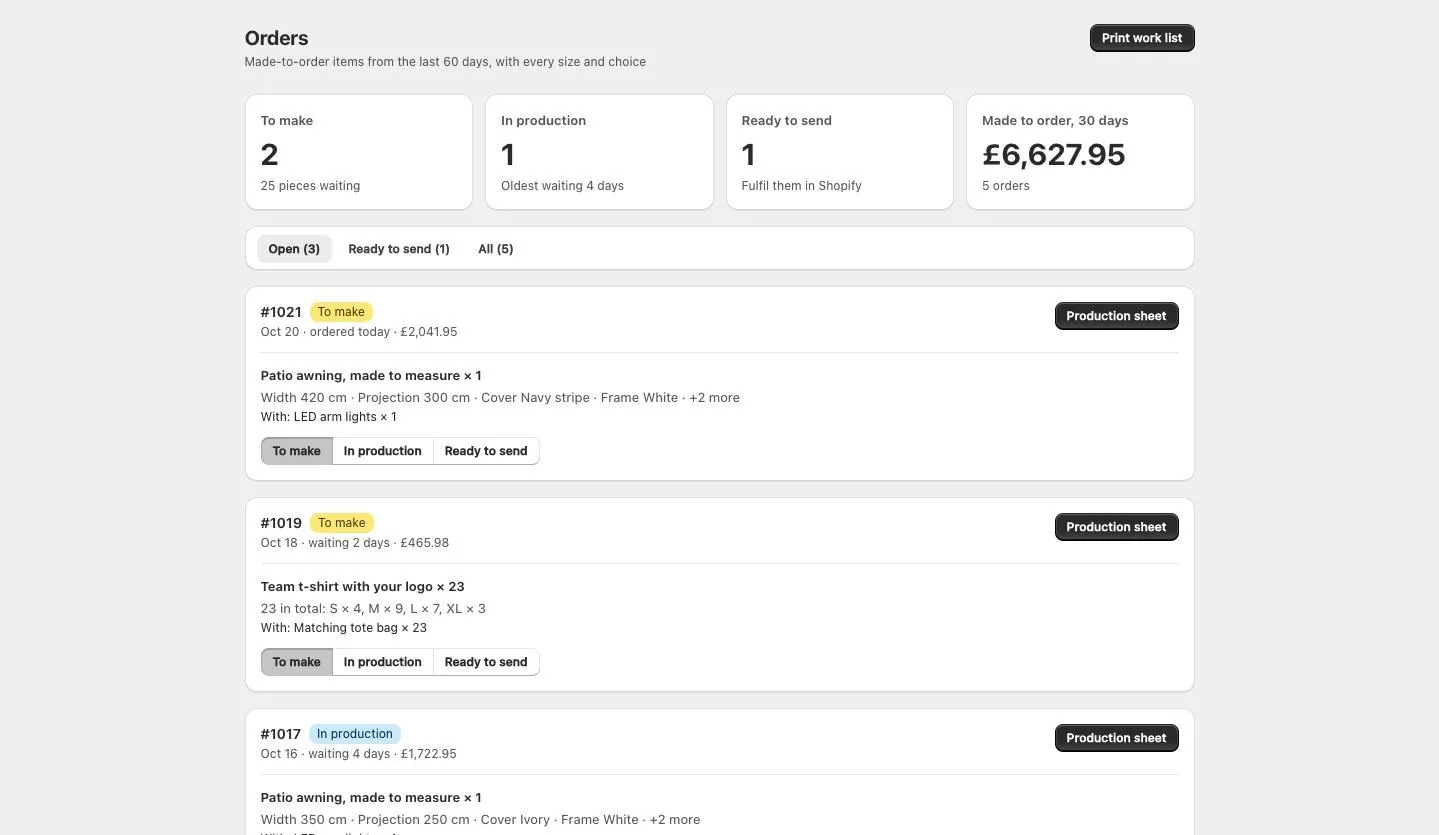
The size, every choice and the logo file are on the order in Shopify. Inchy turns them into a sheet your workshop can work from, and keeps track of what is waiting.
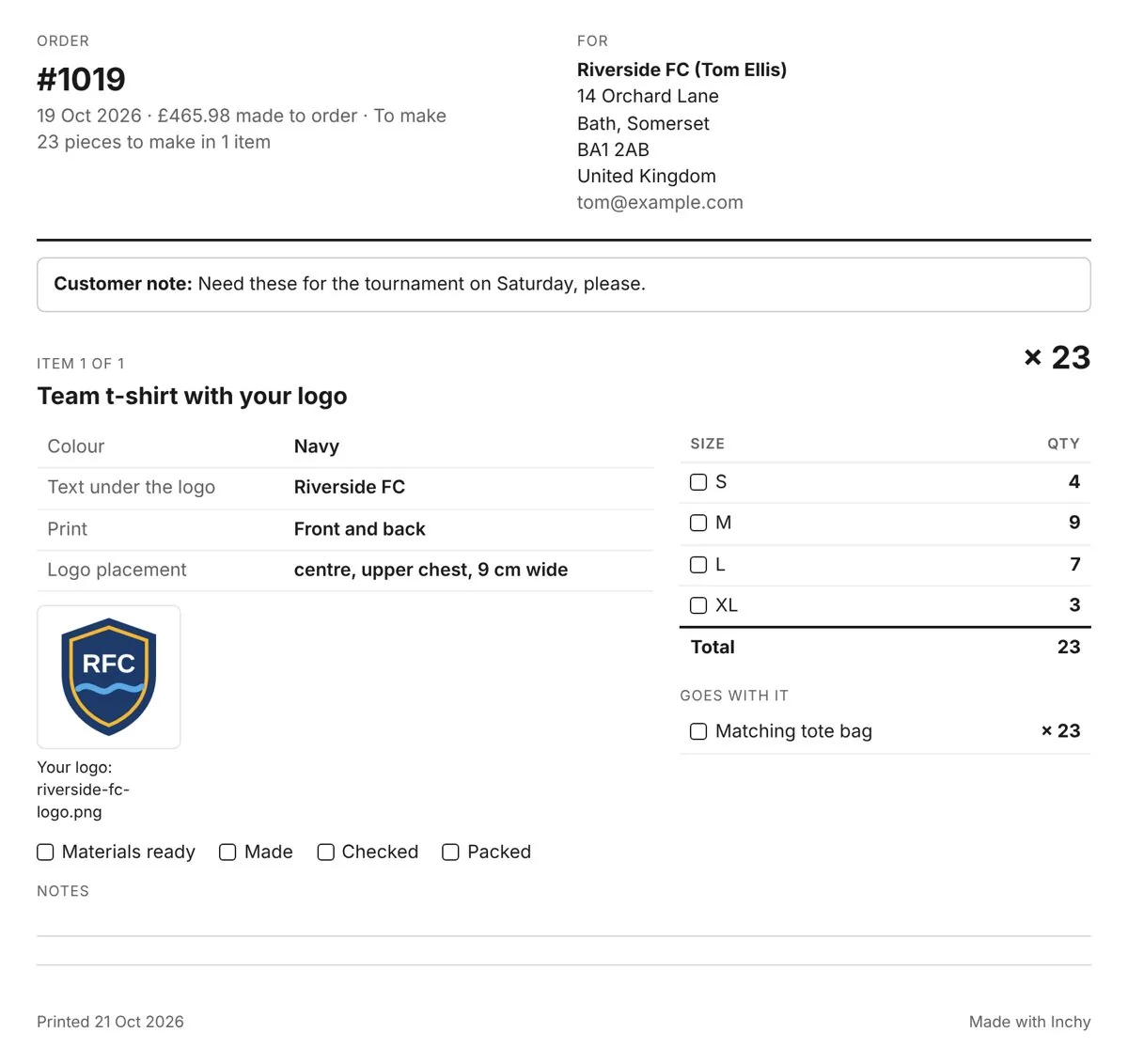
A production sheet from Shopify's Print menu
Open an order, or tick several in the order list, and choose Print. Each order prints on its own page with sizes, choices, logo files and add-ons, and boxes to tick as the work is done.
To make, in production, ready to send
Move an order along from its page in Shopify or from Inchy. You see how many pieces are waiting and which order has waited longest.
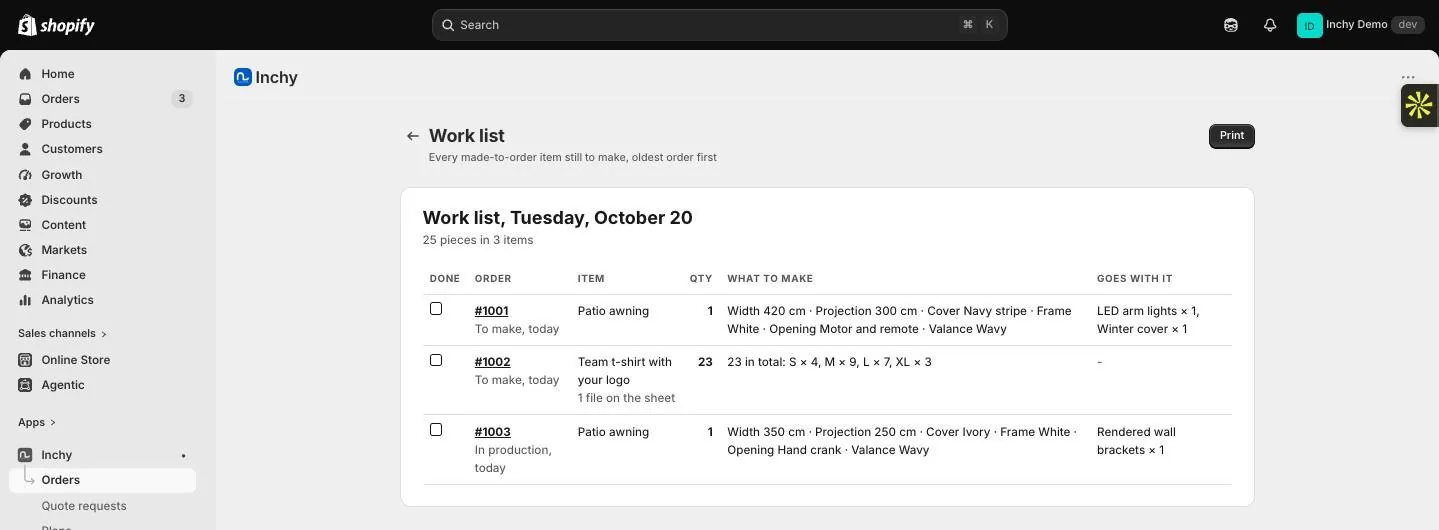
A daily work list
One printed page with every piece still to make across your open orders. A team order reads 4 S, 9 M, 7 L and 3 XL, not 23 separate lines.
Right in your shop, on every screen
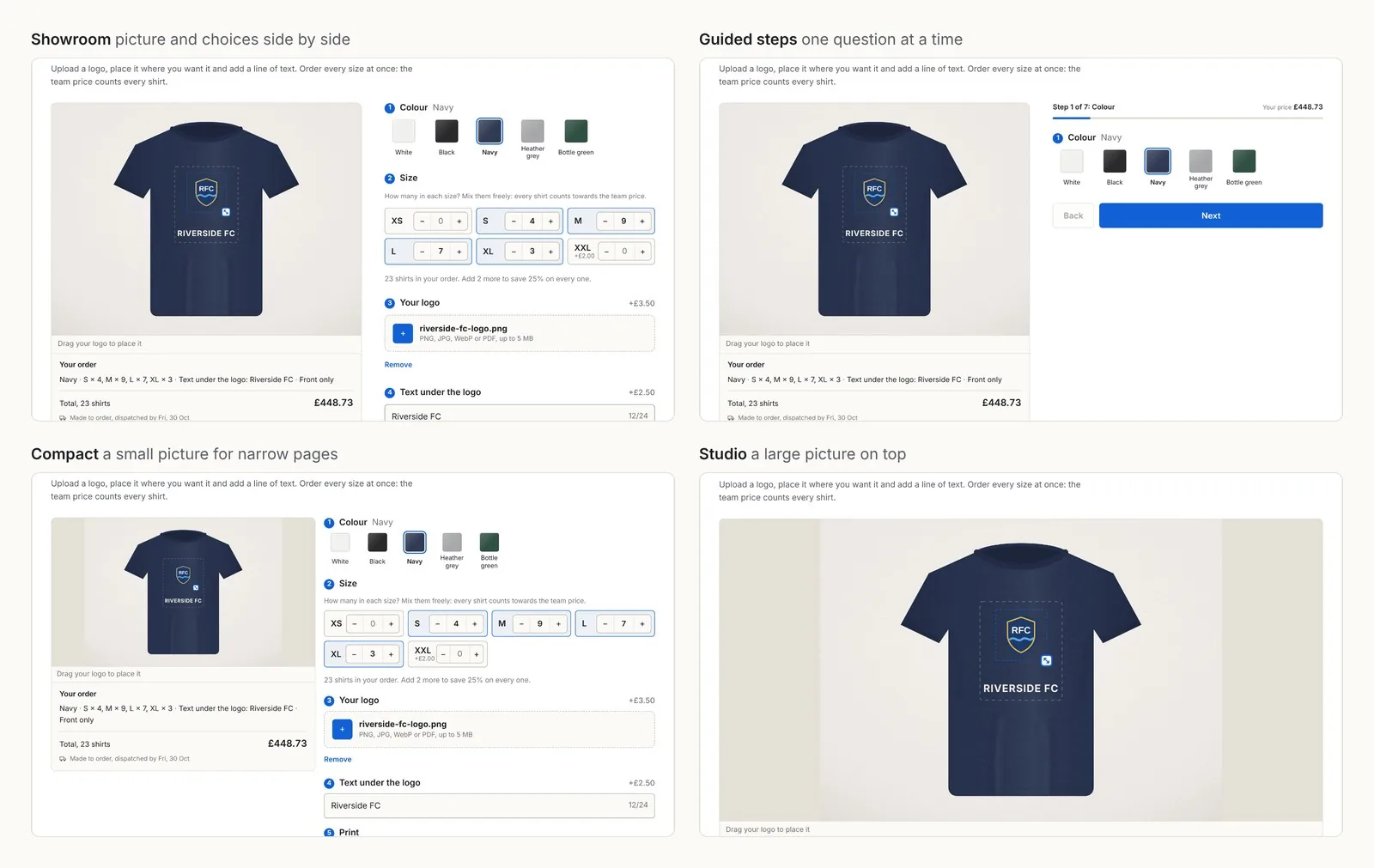
- Showroom, guided steps, compact or a large picture on top: pick the look that suits your product page
- Fonts and text colour come from your theme, and you set the button colour
- On phones the total and the button follow the shopper down the page
- Choices and buttons are sized for fingers, not only for a mouse
- Sizes in centimetres, millimetres or inches; prices in the shopper’s currency
What happens after you install
You can do it yourself in the app, or we set up your first product with you on a call.
- 1
Pick a template
Awnings and outdoor shade, or t-shirts and team wear. Each comes with sample prices you replace.
- 2
Put in your prices
Paste your price list from a spreadsheet. Add your fabrics, colours, options and extras.
- 3
Choose the look
Pick a look and a style, and check it in the live preview at phone and computer size.
- 4
Publish
Add the Inchy block to your product page once. Every product with a live builder shows it.
- 5
Make the orders
Every size and choice lands on the order in Shopify. Print the production sheet and move each order on as it is made.
One price, every product
A shop with one product and a shop with five hundred pay the same. Billed by Shopify in US dollars with your store bill. No fee per order.
- Unlimited products and unlimited orders
- Prices by width and projection, by square metre, by metre or per item
- The product drawn at the shopper’s size, or with their logo
- Team orders in every size at the team price
- Add-ons priced for the chosen size, and fabric samples
- Quote requests for big jobs, by email and in the app
- Production sheets, order stages and a daily work list
- The same price at checkout as on the page
Design pack
+$4.99 a monthEvery look and style for the builder. Optional, add or remove at any time.
Bundle kits
+$4.99 a monthSets of add-ons sold together at a saving. Optional, add or remove at any time.
Selling curtains, blinds or shutters?
Inchy does not price window coverings. They need fabric widths, fullness, hems and track rules, which our Curtain & Blind Calculator handles. See the Curtain & Blind Calculator
Why shops can rely on it
The checkout price is checked
The price is worked out again at checkout from your rules. A shopper cannot change it in the browser.
No orders you cannot make
A size outside your limits, or a product added without a size, is stopped before payment.
Nothing changed in your theme files
Inchy is a theme app block. Remove the block and your theme is exactly as it was.
Your data stays in your store
Products, prices and quote requests are kept in your own Shopify store.
People who know the trade
We have priced and sold made to measure since 2011, in our own shop first. When you ask a question, you talk to us.
Already in use
Our quoting software and calculators are used by made to measure businesses in the UK, Europe, Australia and New Zealand.
Some of the businesses using our software and calculators: Just Blinds, Brilliant Curtain, Foundoulis Shading & Fabrics, Curtain Pole Interiors, Gustin Decor, Impulse Imports and ADmaja.
Questions shop owners ask
What is Inchy?
Inchy is a Shopify app for products made to size or made to order. Shoppers type their size or upload a logo, see the product redraw, and pay the exact price from your own price list at checkout. It is built for awnings and outdoor shade, and for t-shirts and team wear ordered in every size at once. It costs $19.99 a month with unlimited products and a 7-day free trial.
How do I add a custom size price calculator to Shopify?
Install Inchy, pick the awning or t-shirt template and paste your price list from a spreadsheet. Set the smallest and largest sizes you make, then publish and add the Inchy block to your product page once. Shoppers type their width and projection and see the price for that exact size. The same price is charged at checkout.
What is the best Shopify app for made to measure awnings?
Inchy was built for awnings. Shoppers type the width and projection in centimetres or inches, or drag the size on a drawing of the awning, then choose the cover, frame and motor and see the exact price. The price comes from your own price grid and the checkout charges the same. Add-ons such as a winter cover are priced for the chosen size, and shoppers can order a fabric sample.
How do I take team t-shirt orders in many sizes on Shopify?
With Inchy the shopper sets how many shirts they need in each size on one product page, for example 10 S, 12 M and 8 L. Every shirt counts towards the team price, and each size goes in the basket as its own line with the logo and text, so your workshop sees exactly what to print. A size that costs more, like XXL, is charged exactly.
How much does it cost?
$19.99 a month for every must-have feature, with unlimited products and a 7-day free trial. Two extras cost $4.99 a month each: the Design pack, with every look and style, and Bundle kits, for sets of add-ons sold together at a saving. Billing goes through Shopify, and there is no fee per order.
How is it different from a product options app?
A product options app adds choices and price add-ons to a product. Inchy also prices by size from your own price list, draws the product at the shopper’s size or with their logo, takes team orders across sizes, and sells quantity offers and bundles, all in one app. The checkout charges the price the page showed.
Does the price at checkout always match the product page?
Yes. The product page and the checkout use the same price rules. At checkout the price is worked out again from your rules, so it cannot be changed in the browser, and it works on every Shopify plan.
Will it work with my theme?
It works with Online Store 2.0 themes, which is every current Shopify theme, as an app block on the product page. It takes its fonts and text colour from your theme, and you can set your own button colour. If anything looks off, we fix it with you.
Can I use my own price list?
Yes. Paste it from a spreadsheet: prices by width and projection, by square metre or by metre, or one price per item with extras for the logo, the text and the print. Options can add a fixed amount, an amount per metre or square metre, or a percentage.
How do I print a production sheet for made to order Shopify orders?
Open the order in Shopify, choose Print and pick the Inchy production sheet. For several orders, tick them in the order list and choose Print in the same way. Each order prints on its own page with every size, choice, logo file and add-on, and boxes to tick for materials ready, made, checked and packed. Inchy also prints a daily work list of every piece still to make.
Where do I see the size and options a customer chose?
On the order in Shopify. Each made to order item lists the size, every choice and any logo or text, and the Inchy panel on the order page sums it up with the stage and a link to the production sheet. A team order shows how many of each size, for example 4 S, 9 M, 7 L and 3 XL.
Can shoppers ask for a quote instead of buying?
Yes. Big sizes or orders above an amount you set can go to a quote form instead. Requests arrive in the app and by email, with every measurement in them.
What if my product is not in the list?
Start from the closest template or from scratch. For any product with sizes and options the price works the same way. Products without a drawn picture can show your own photo for each option.
Does Inchy price curtains, blinds or shutters?
No. Curtains, blinds and shutters need fabric widths, fullness and track rules, so they are priced by our Curtain & Blind Calculator, the full made to measure calculator for window coverings on Shopify. Outdoor blinds, zip screens and awnings are fine in Inchy.
Can you match it to my brand, or build something special?
Yes. We can match the look to your brand. For special rules or a custom picture, tell us on a call what you need and we quote it.
How do I cancel?
Billing goes through Shopify. Change or cancel your plan in the app at any time.
Try it with your own products
Install Inchy and use everything free for 7 days. Prefer a hand? Book a 20 minute call, send us one price list before it, and we put it in with you.
Inchy is a Shopify app by InterioApp (UAB Curtains Calculator). Demo products and prices are samples; each shop sets its own. Guides on made to order selling: Inchy on PUBlish.